Licensing
AI Admin Panel is proprietary software with Free, Power User, and Web Host editions. You can complete setup with Free, start a paid-edition trial, or activate an existing key. A paid key is not required to use Free.
Choosing an edition during setup
Enter your licence key on the edition step and leave the field to validate it. A valid key selects its matching edition, including Web Host. An installer-provided key is checked automatically. Wait for validation before continuing. Validation checks the key; activation happens when you complete setup.
To choose a keyless edition, remove a manually entered key. Editing or removing it restores your previous choice, or asks you to choose if none was selected. Without a key, choose Free or a 14-day trial of Power User or Web Host.
Editions
The built-in edition matrix distinguishes these capabilities:
| Edition | Intended use | Included capabilities |
|---|---|---|
| Free | A personal server or evaluation | Template catalog, AI deploy and operations, monitoring, notifications, customer portal, audit log, local backup; up to 3 customers and 5 services |
| Power User | Personal VPS or small team | Free capabilities, unlimited customers and services, custom domains and S3 backup; no reseller hierarchy |
| Web Host | Hosting providers managing resellers | Power User capabilities plus organizations, RBAC, resource plans, projects, and service plans |
Open Settings → Security & License → License for your installation's status, edition, limits, expiry, and activation or re-validation actions. A licence can carry a versioned edition definition; use the displayed entitlements for that installation. Unlimited edition counts still depend on server capacity and configured quotas.
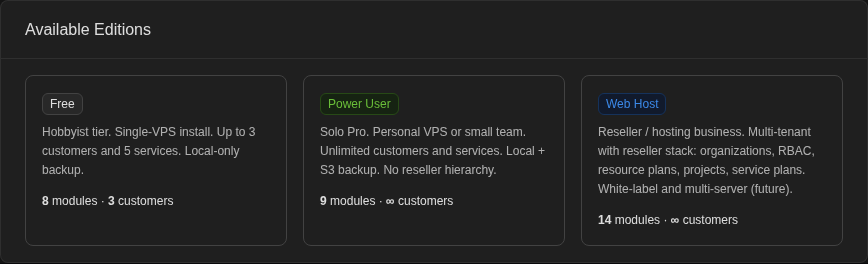
This crop shows only the edition comparison, excluding the installation's licence details. Features labelled future in the cards are not shipped capabilities.
Trial and expiry
The default trial lasts 14 days for the selected paid edition. A seven-day grace period follows, with reminders in the panel. After grace, the panel falls back to Free. Existing customer and service records are preserved; Free limits can prevent new creations. Paid-key validation and connectivity failures have separate cached status and recovery handling: follow the status shown on the License tab rather than treating every validation error as a trial expiry.
Paid licences are bound to an installation. If you move or restore an installation and the panel requests a re-bind, use the licence recovery action and verify the result before relying on paid features.
Hosting and external connections
The panel and deployed workloads run on infrastructure you control. Self-hosting does not mean that no data leaves the server: paid-key validation and activation contact the configured licensing provider. Updates and image pulls, certificate issuance, managed DNS, and any external AI, email, backup, or notification provider also need their respective external services. Choose providers and storage locations that fit your requirements.
Legal documents
The setup wizard requires EULA acceptance and contact consent. Settings → Legal provides the legal documents and acceptance record. Consult the published EULA, Privacy Policy, and Terms of Service for legal terms. This guide describes the product's edition controls; it does not replace those terms.