Transferring licenses and customers
A transfer moves commercial ownership from one partner to another — for example, a distributor handing an account down to one of its sub-resellers. You do it yourself from the Transfers page in Partner Center.
There are two kinds, and picking the right one matters:
| Kind | What moves | Use it when |
|---|---|---|
| Transfer license | One single license | A single subscription changes hands, but the customer stays where they are. |
| Move customer book | A customer and every license under it | A whole account changes hands — the usual case when you hand an account to a sub-reseller. |
The database book move uses one transaction for the customer and its licenses. License-service metadata is synchronized afterwards on a best-effort basis; a completed move can still need a vendor sync retry.
What you can move, and where
You can only move things inside your own downline — your own account and the partners beneath it. Both ends have to be yours: the thing being moved and the partner receiving it. Anything else simply isn't offered in the form, and is refused by the server even if asked for directly.
That's also why the Destination partner list only shows your own account and your sub-resellers. If a partner you expect isn't listed, it isn't in your downline.
Terminated and expired licenses cannot be selected for a single-license transfer. They don't appear in the license dropdown, and the server refuses them if asked directly. There's nothing left to bill on a license that has ended, so moving one would record a transfer in the history while nothing actually changed hands — neither partner's license count would move. If a license you expect isn't in the list, check whether it has already been terminated.
Suspended licenses can be moved. A suspended license still bills under its contract and can be resumed later, so it's a real thing to hand over. The dropdown marks it — you'll see (suspended) after the license key — so you know what you're picking.
Who can transfer
| Role | Can transfer? | Can see the history? |
|---|---|---|
| Owner | ✅ Yes | ✅ Yes |
| Member | ✅ Yes | ✅ Yes |
| Billing | ❌ No | ✅ Yes |
| Read-only | ❌ No | ✅ Yes |
Everyone can read the transfer history. Only owners and members see the two buttons that start a move.
Before you start
The receiving partner needs an active contract — that's what the moved licenses will bill under from now on. If the destination's contract dropdown is empty, that partner has no active contract yet and you'll need one set up before the move.
For a single-license transfer the destination partner also needs a customer to attach the license to. (A book move doesn't: the customer is what's moving.)
Transfer a single license
- Go to Transfers in the sidebar.
- Click Transfer license.
- Fill in the form:
- License — the one to move. Terminated licenses aren't listed; there's nothing left to move.
- To partner — who receives it. Your downline only.
- To customer — which of that partner's customers it attaches to.
- To contract — the terms it bills under from the effective date. Only active contracts appear.
- Effective date (optional) — when the change counts for billing. Leave it blank for today in UTC.
- Reason (optional) — free text, kept on the history row. Worth filling in; it's what makes the history readable a year from now.
- Click Save.
Changing To partner clears the customer and contract you'd already picked — they belong to the previous partner and would no longer be valid. Re-pick them.
Move a whole customer book
- Go to Transfers and click Move customer book.
- Pick the Customer to hand over, the To partner, and the To contract those licenses will bill under.
- Optionally set an effective date and reason, then Save.
There's no "to customer" field here — the customer itself is what moves, carrying its licenses with it.
After a transfer
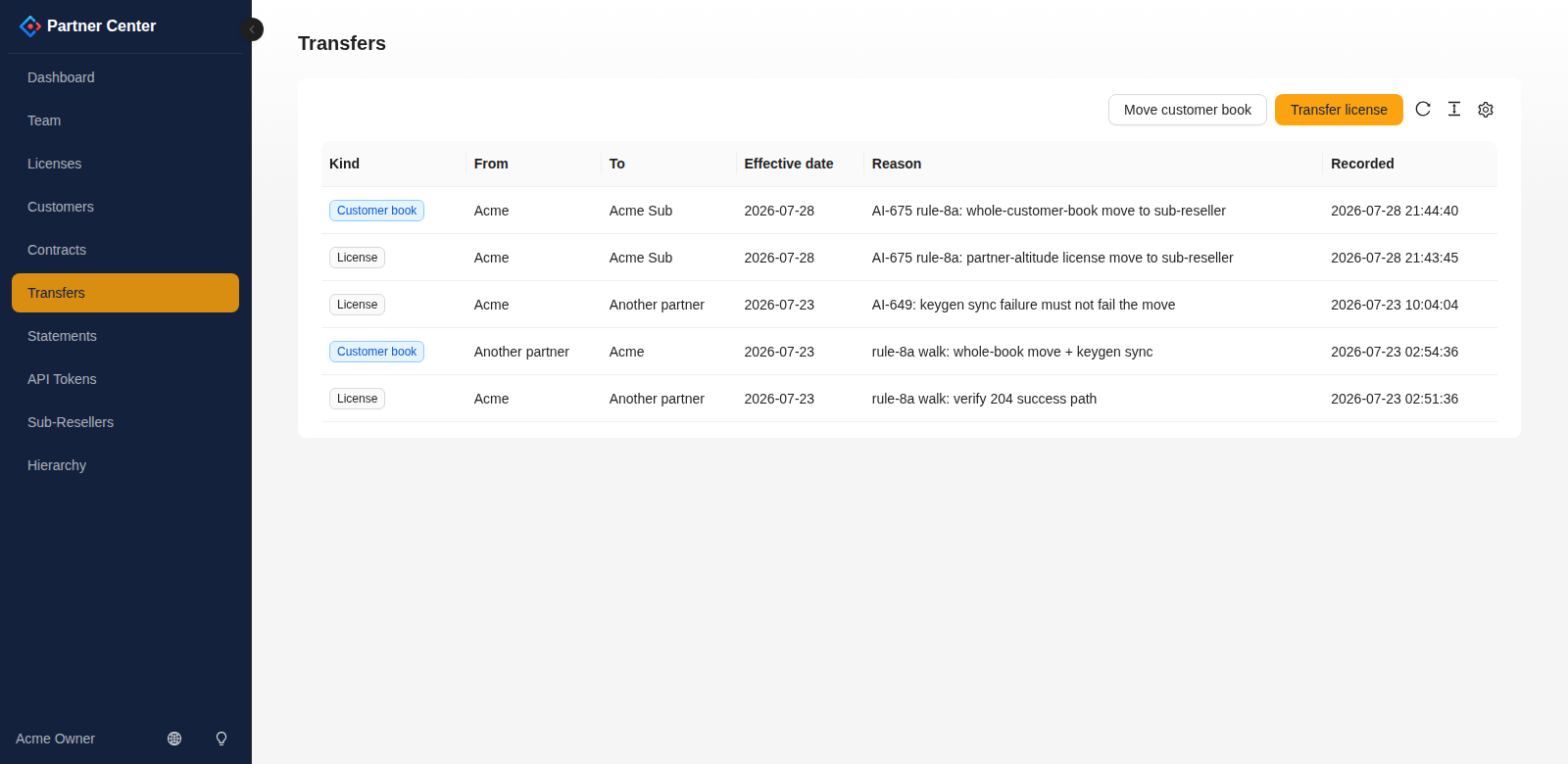
- The move appears at the top of the Transfers history, tagged License or Customer book.
- The licenses show their new owner on the Licenses page.
- Billing splits at the effective date: the old partner's statement stops accruing then, and the new partner's starts. Both sides see their half on their own statement.
- The license key does not change. The transfer changes commercial ownership; it does not deploy, restart, or migrate the customer's panel.
The public token API exposes single-license transfers. Whole-customer-book moves use Partner Center; they are not a POST /v1/transfers option.
Reading the history
| Column | Meaning |
|---|---|
| Kind | License (one license) or Customer book (a customer and its licenses). |
| From / To | The partners on each end. |
| Effective date | When the move counts for billing. |
| Reason | Whatever was typed when the move was made. |
| Recorded | When it was actually performed — often not the same day as the effective date. |
The history shows every move with either end in your downline, so you'll also see accounts moved to you. When the other end is a partner outside your downline, it shows as Another partner — you can see that the move happened without seeing someone else's account name.
Troubleshooting
| What you see | What it means |
|---|---|
| No Transfer license / Move customer book buttons | Your role can't transfer (billing/read-only). Ask an owner. |
| A partner missing from To partner | It isn't in your downline. You can only move within your own tree. |
| A license missing from the license dropdown | It's terminated or expired. Ended licenses can't be transferred — there's nothing left to bill. |
(suspended) next to a license key | Normal. Suspended licenses can still be moved; the label is there so you don't pick one by accident. |
| Empty To contract dropdown | The destination partner has no active contract. Get one set up first. |
| Empty To customer dropdown | The destination partner has no customers yet — create one on their behalf, or use a book move instead. |
| "Not found" when saving | One end of the move is outside your downline. Re-check the destination. |
| A row reading Another partner | Normal — the far end of that move is outside your downline. |
Doing this programmatically
Everything above is available on the Partner API: POST /v1/transfers moves a single license, with the same downline rules. Useful if you're reconciling ownership in bulk rather than one account at a time.