Statements
A statement records your own partner account's monthly charges under its contracts. It is not a subtree rollup: sub-resellers with contracts have their own statements, and licenses issued in an earlier month can still accrue. You never have to ask for one or run a report: every partner's current-month statement is kept up to date automatically, and once the month closes and we've reviewed it, it becomes the finalized document you download and reconcile against.
This page explains how a statement gets its numbers, what the different states you'll see mean, and what happens if a statement needs to be corrected after the fact.
The one rule statements are built on
Every day a license exists, it bills to exactly one partner — the partner who owned it that day. Billing dates and period boundaries use UTC. A metered license bills for every calendar day from the day it was issued through the day it was terminated, both days counted.
Two consequences worth knowing up front, because they surprise people:
- A suspended license still bills. License suspension does not stop the billing clock. If you want to stop paying for a license, terminate it. This is deliberate — it's the same "terminate to stop paying" rule you'd expect from most hosting control panels, and it means nobody can dodge a bill by suspending-and-resuming a license they're still holding.
- A transfer splits the day cleanly, never doubles it. If a license moves from one partner to another partway through the month, the day of the transfer belongs to the new owner. There is no day where both partners get charged, and no day where neither does.
A transfer, concretely. Say a license is issued to Partner A on July 1st, and on July 16th it's transferred to Partner B (a re-parenting to a different reseller, a customer moving between your sub-accounts — same rule either way). Partner A's statement bills that license for July 1–15 (15 days); Partner B's statement bills it from July 16th onward. Whatever day you pick, the license's cost lands on exactly one of the two statements — never both, never neither.
How each pricing model bills
Your contract with us has a model that decides how a line on your statement is priced:
| Model | How it bills |
|---|---|
Metered (per_instance_metered) | Each license bills its own day-rate: your contract's monthly unit price, divided by however many days are in that month, multiplied by the days that license was billable. A license issued on the 1st and still active on the 31st of a 31-day month bills the full monthly price; a license active for only part of the month bills that same fraction of the price. |
Flat (flat_unlimited / flat_capped) | One flat monthly fee for the whole contract, prorated the same way — by how many of the month's days the contract itself was valid (not by license count). If your contract only started partway through the month, you pay that fraction of the flat fee. |
| Prepaid pack | €0 on the statement. You already paid when you bought the pack; the statement just shows how many licenses were drawn from it this month and how many remain. |
| Trial / NFR | €0 on the statement. Trial and not-for-resale licenses are never charged; the statement shows the count for visibility only. |
All prorated amounts are rounded to the nearest cent (rounding exactly half a cent up), and a line's total is always the exact sum of what's behind it — never a separately-rounded number.
A worked example
Here's a synthetic July statement fixture line-by-line, so the arithmetic above isn't just theory. This partner has four contracts:
Metered contract — €10.00/license/month, 5 licenses, July (31 days in the month):
| License | Billable days | Why | Amount |
|---|---|---|---|
****-0001 | 31 | Issued in June, still active all of July — full month | €10.00 |
****-0002 | 10 | Issued Jul 10, terminated Jul 19 (both inclusive) | €3.23 |
****-0003 | 27 | Issued Jul 5, suspended Jul 10, resumed Jul 20, still active — the suspension changes nothing | €8.71 |
****-0004 | 15 | Issued Jul 1, transferred to another partner effective Jul 16 — this partner keeps Jul 1–15 | €4.84 |
****-0005 | 1 | Issued and terminated the same day, Jul 8 | €0.32 |
| Line total | €27.10 |
(License ****-0002's day-rate: 10 days ÷ 31 days in July × €10.00 = €3.2258…, rounded to €3.23. Every row above follows the same formula — days billed ÷ days in the month × monthly price, rounded to the cent.)
Flat contract — €50.00/month, valid from July 20th:
The contract itself only existed for 12 of July's 31 days (the 20th through the 31st, inclusive), so it bills 12 ÷ 31 × €50.00 = €19.35 — regardless of how many licenses were issued under it.
Prepaid pack — 2 licenses drawn this month: €0.00 (already paid for when the pack was purchased).
Trial contract — 1 trial license, 29 days: €0.00 (trials are never charged).
Statement total (EUR): €27.10 + €19.35 + €0.00 + €0.00 = €46.45.
If your contracts span more than one currency, you get one statement with one total per currency — never a separate statement per currency.
The statement lifecycle
A statement moves through exactly three states, and it only ever moves forward:
draft  ──(root finalizes)──>  finalized  ──(root issues a correction)──>  superseded
  ^                                                                            │
  └────────────────────(the correction creates a new draft)───────────────────┘
- Draft. The current month's statement is always a draft, recomputed automatically every day (and instantly on request by our staff) as new license activity comes in. This is the same number you see on your dashboard's month-to-date tile and from the
/usageAPI endpoint — it's a live, running total, not yet a bill. You never download a draft; it exists so you can watch the month build up before it closes. - Finalized. Once the month ends and our staff has reviewed it, the statement is finalized. From that point it is permanently locked — the application locks its financial rows against ordinary updates and deletes. Superseding can still change its status metadata. This is what you reconcile your books against and what you download.
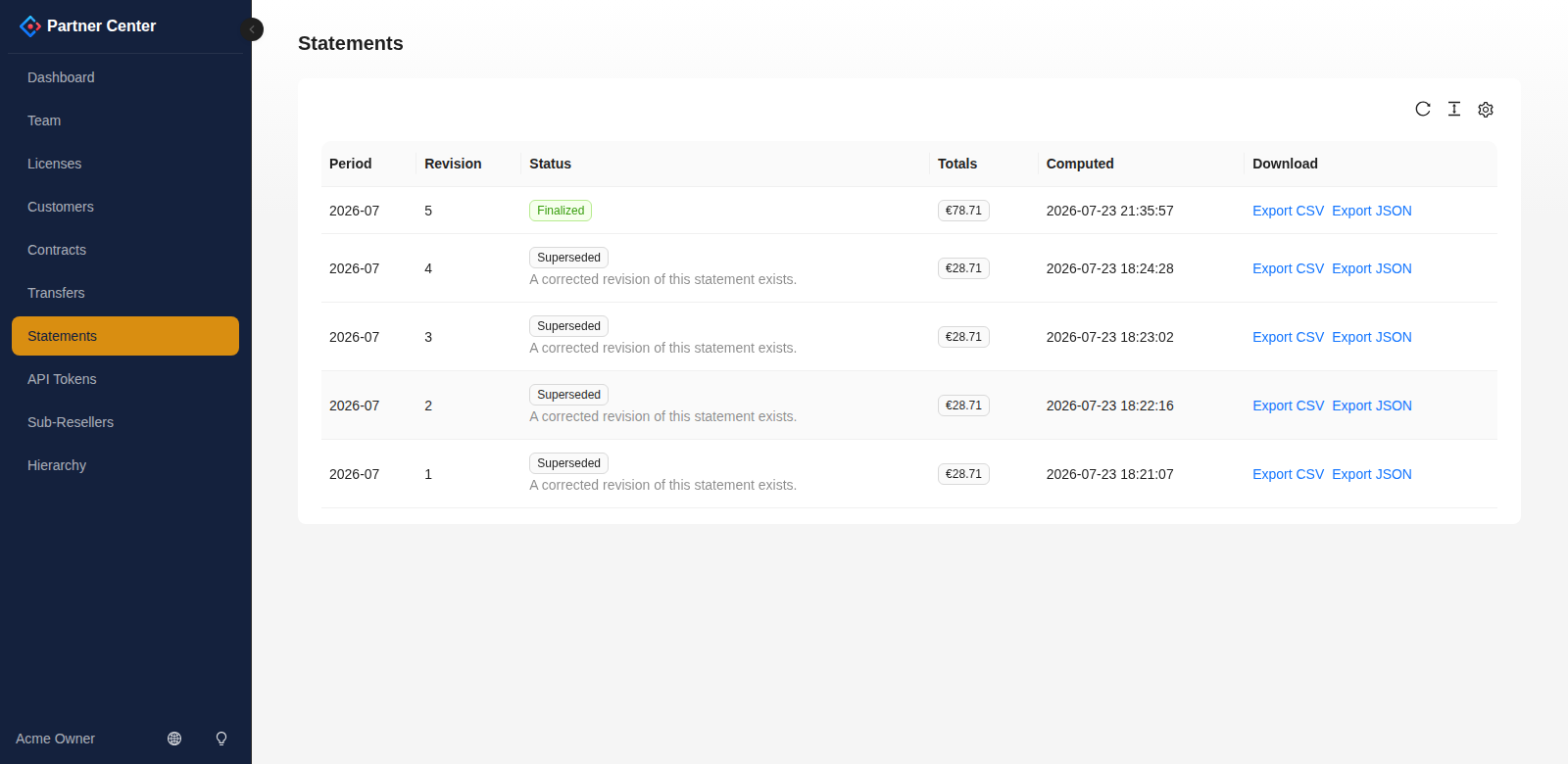
- Superseded. If a finalized statement turns out to be wrong — a license transfer that got recorded a few days late, a corrected contract price — we don't edit the old statement. We supersede it: the old one is marked superseded (it stays visible so you can see exactly what changed and why) and a brand-new draft is computed from today's records, which then goes through the same review-and-finalize path as any other statement, as its own new revision.
Why supersede instead of edit? A finalized statement is meant to be something you can trust completely once you've downloaded it — the numbers behind it never move under you. If something needs to change, you get a clearly-marked replacement instead of a silently-altered original, so a document you already reconciled against never quietly stops matching what you filed away.
Viewing and downloading your statements
Portal → Statements shows your account's statement history — every finalized and superseded statement, most recent first. Drafts don't appear here; watch the current month building up on your dashboard's month-to-date tile instead.
Opening a statement shows its lines, and — for metered contracts — the per-license breakdown behind each line (the same table shown in the worked example above). A statement flagged superseded links to nothing extra in the UI beyond the flag itself; if you need the statement that replaced it, look for the next revision of the same period in the list.
Every statement can be downloaded as CSV (one row per license, plus one row for any amount that belongs to the contract as a whole rather than to a single license — a flat monthly fee, for example — so the file's amount column always adds up to exactly what you're billed) or JSON (the full statement document, useful for scripting). Rows carrying a contract-level amount leave the license columns empty. Both formats are deterministic for the same stored data. Superseding changes status metadata, so preserve an earlier download if you need its exact bytes.
Who the statement is addressed to
At the top of the Statements page is a Billed to card: the legal entity we invoice, its VAT or tax id, the billing address, the address statements are sent to, and your own reference if you gave us one.
Check it, especially the VAT id and the legal name. These are the details that appear on the invoice, and a wrong tax id is the kind of thing an accounts-payable department rejects a month later rather than querying on the day.
The card is read-only, and deliberately so — the tax identity on an invoice we issue is not something that should change without us knowing. If anything on it is wrong or missing, tell us and we'll correct it.
| Field | What it's for |
|---|---|
| Legal name | The registered company name on the invoice. Often longer than the trading name you see everywhere else in Partner Center. |
| VAT / tax ID | Your tax registration, as it must appear on our invoice to you. |
| Billing email | Recorded contact address for billing correspondence; this card is not evidence that a statement email was sent. |
| Your reference | Your own PO or account number, printed on our invoice so your accounts team can match it without calling us. |
| Address | Street, postal code, city, region and a two-letter country code. |
Blank fields mean not recorded yet, not not applicable — if you see blanks here and you expect an invoice, that's worth a message to us.
Programmatic access
Everything on the Statements page is also available over the Partner API — GET /usage for the live current-period summary, and GET /statements, GET /statements/{id}, and GET /statements/{id}/export for your finalized and superseded statement history. See the API reference for full request/response detail.